
You click a link in an email. It looks legitimate. You sign in with your credentials. You approve the multi-factor authentication prompt on your phone. Everything checks out.
And in that exact moment, someone else just gained full access to your account.
This is an Adversary-in-the-Middle attack, also known as a man-in-the-middle attack or AiTM. And it’s happening right now to Tampa Bay businesses. The hard part to accept? Your MFA protected you from almost nothing.
The Phishing Game Changed. Most Businesses Didn’t Notice.
For years, phishing attacks were about stealing passwords. A hacker would send a convincing email with a fake login page, collect your credentials, and try to use them later. Multi-factor authentication shut that down. No password, no entry.
But cybercriminals are smarter than that now. They’ve moved on from stealing passwords because MFA already stops that approach. Instead, they’re after something more valuable and immediate. They want your authenticated session. They want the proof that you’ve already logged in successfully.
The difference is subtle but critical. And it changes everything about how you need to think about security.
How Adversary-in-the-Middle Attacks Actually Work
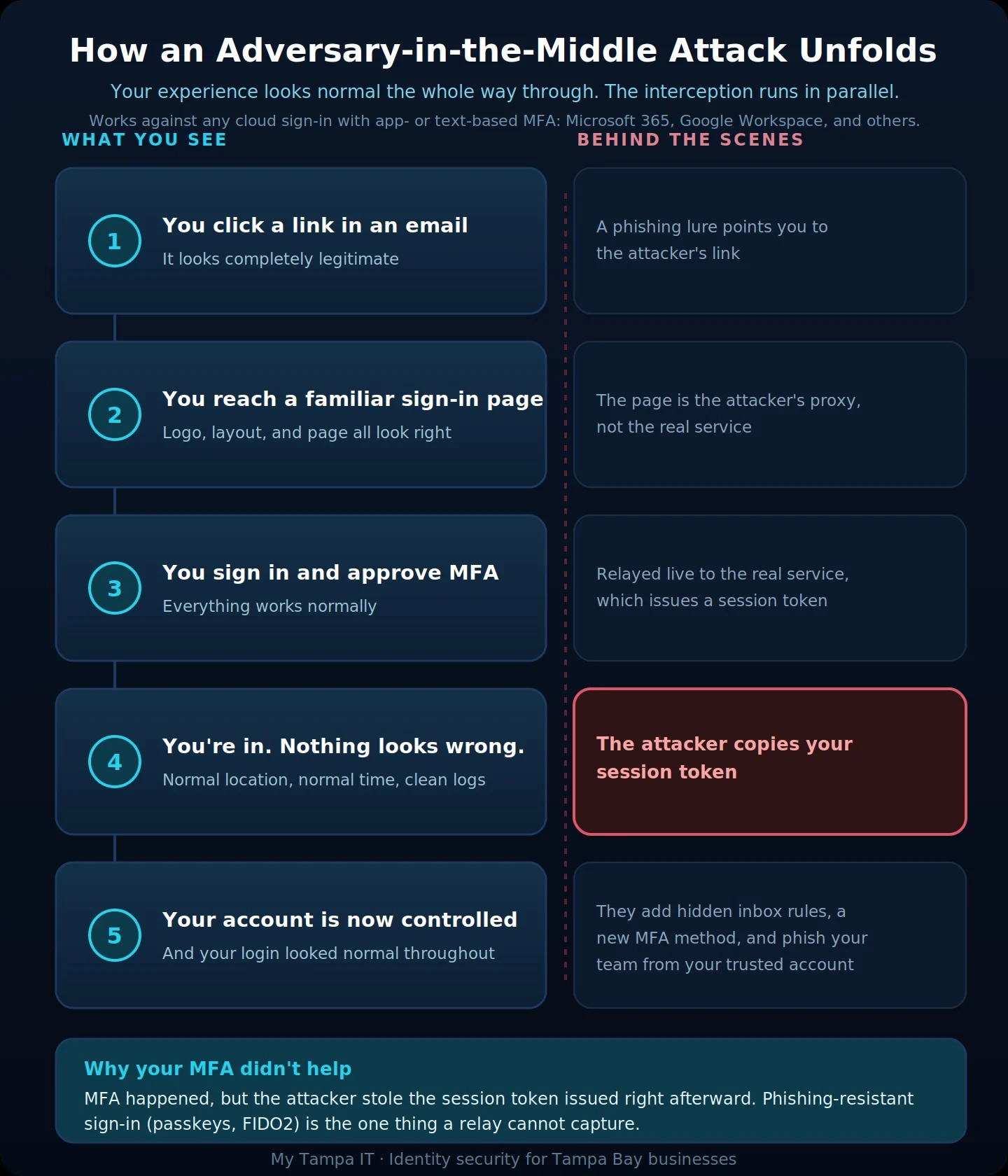
These attacks usually start with tactics like AI-powered social engineering, a convincing message designed to get you to click before you ever notice anything is wrong. Imagine you get a phishing email that looks perfect. The link goes to what appears to be your cloud service login page. You click it. The page loads. It looks exactly right. The company logo is there. The formatting is correct. Everything functions properly.
But here’s what’s actually happening with an AiTM attack. The page you’re looking at isn’t a simple fake. It’s a trap that sits between you and the real service. Your login credentials, your MFA approval, your entire authentication process flows through the attacker’s system in real time. They see everything you do. They forward everything to the real service. The real service responds. They forward that back to you.
From your perspective, nothing is wrong. The page works perfectly. The MFA prompt functions normally. You get logged in successfully.
And the attacker has captured your session token. That’s the digital proof that you’ve already authenticated. It’s the key that says “this person is verified, no password or MFA needed.”
This is also called session hijacking, because the attacker effectively hijacks your current active session. Whoever holds that token holds your account access.
Why Your Multi-Factor Authentication Isn’t Helping In This Case
Here’s where most business owners get confused. They think MFA protects everything. It doesn’t.
MFA protects the moment you’re logging in. It requires a second form of verification when you’re entering your password. That’s genuinely important and you absolutely need it.
But MFA doesn’t protect what happens after you’ve successfully logged in. Once you’ve completed the authentication process, the system issues a session cookie. You may have heard of session cookies if you’ve read about web security. That cookie essentially tells your cloud service “this person is verified. Let them do what they need to do without asking for a password or MFA again.”
This is necessary for productivity. You don’t want to approve MFA every time you click a link or open a file. So the system trusts the session token.
An adversary-in-the-middle attack simply waits for that token to be issued, captures it, and uses it immediately. The attacker doesn’t need your password. They don’t need to approve your MFA. They just need that cookie.
In its Digital Defense Report, Microsoft reported a 146 percent increase in these attacks. Cybercriminals are using automated tools that make running these attacks almost routine. Even low-skilled attackers can launch convincing campaigns at scale, targeting major cloud providers like Microsoft 365 and Google Workspace.
What Happens After Your Session Gets Stolen
Here’s what makes this type of attack so dangerous. It’s quiet.
The attacker is operating inside a legitimate, authenticated session. There are no failed MFA attempts. There are no unusual login alerts. The system shows someone accessing your account from your normal location at your normal time. Everything looks fine in your login logs.
But inside your account, the attacker is creating hidden email rules to redirect your mail to them. They’re adding their own phone number as a secondary MFA method so you can’t lock them out. They’re reading your email threads to see who you do business with and what’s being discussed. They’re using your trusted account to send phishing emails to your colleagues and finance team.
This is why these attacks are frequently discovered late. By the time someone notices something is wrong, the attacker has already redirected emails, moved money, accessed sensitive data, or compromised other people in your organization.
What Actually Reduces Your Risk
Multi-factor authentication is still essential. It’s a baseline, and you need it. But it is not enough by itself. Tampa Bay business leaders need to understand that security requires layers: you have to protect the login process, and you also have to protect what happens after someone is logged in. Here is where to focus.
Use authentication that can’t be intercepted
Hardware security keys and passkeys, built on the FIDO2 standard, work differently from app or text-based MFA. They bind your sign-in to both the specific device and the legitimate website address. Because the credential is cryptographically tied to the real site, a proxy sitting in the middle has nothing it can capture and replay. If the address isn’t the genuine one, the sign-in simply fails. This is why Microsoft now points to passkeys as the most effective defense available against AiTM attacks.
Monitor for what happens after login
You need to watch for unusual activity inside authenticated sessions: new MFA methods being added, email rules created at odd hours, access from locations that don’t make sense, data being touched in ways that are out of pattern.
Your standard login logs won’t show these things. You need monitoring that looks at what authenticated users are actually doing after they’re logged in, not just whether they got in.
Train your team to be skeptical
Your employees need to understand that a working MFA prompt on a page with an odd-looking URL is still a red flag. They need to know that legitimate services always live at legitimate addresses, and they need to feel comfortable pausing before they approve MFA if something feels off.
A quick conversation with your team about what these phishing lures look like in Microsoft 365 contexts can meaningfully reduce your risk before someone falls for it.
This Isn’t Just Technical. It’s a Business Problem.
Most Tampa Bay businesses we talk to assume that if they have MFA in place, they’re protected from phishing attacks. That’s not accurate anymore.
The threat landscape has shifted. The attacks are more sophisticated. The tools are more accessible to attackers. And the damage happens faster.
You need security that works at multiple levels. Not just at the login screen, but throughout the entire session. Not just password protection, but an understanding of how sessions, tokens, and trust actually work inside your cloud services.
What You Should Do Right Now
If you’re running Microsoft 365 or Google Workspace without a clear picture of your session and conditional access controls, you have a gap, and it is reasonable to assume that gap will be tested eventually.
Start by understanding what your current controls actually do. Look at your authentication methods and whether any of them are phishing-resistant. Review what activity monitoring you have in place for after someone logs in. Make sure your team understands that MFA is important but is not a complete solution.
Then build from there.
Ready to Review Your Identity Security?
At My Tampa IT, we help Tampa Bay businesses understand the layers of protection they actually need. We don’t just check boxes on a security checklist. We help you understand how attacks like these actually work, where your real vulnerabilities are, and we stay current with a rapidly changing threat landscape.
If you want to assess your identity and access controls before a cybercriminal uses your own authentication against you or your employees, let’s have that conversation. Contact us today to review your specific vulnerabilities to AiTM attacks and similar threats.
Frequently Asked Questions
Start by finding out whether any of your sign-in methods are phishing-resistant, and move toward passkeys or hardware keys where you can. Pair that with conditional access rules and monitoring that looks at activity after login, and give your team a short heads-up on what these lures look like. If you are not sure where your gaps are, that is exactly the kind of review we can walk through with you.
Yes, and often more than owners expect. Ready-made phishing kits are now sold as subscriptions, so attackers do not need much skill to run a convincing campaign at scale. Many of these attacks are opportunistic rather than targeted, which means a smaller firm with valuable email access and lighter controls can be just as appealing as a large one.
That is the hard part, because these attacks are quiet. The sign-in looks normal, so your standard login alerts usually show nothing. The warning signs tend to appear after the fact: new inbox rules that forward or hide your mail, an unfamiliar phone number or app added as a second MFA method, or messages in your sent folder you did not write. Catching it early usually takes monitoring that watches what happens inside an account after login, not just whether someone signed in.
A passkey is a phishing-resistant sign-in method built on the FIDO2 standard, often using your device’s fingerprint or face unlock, or a physical security key. Unlike a code from an app or a text message, a passkey is cryptographically tied to both your device and the real website address. Because of that, a fake page sitting in the middle has nothing it can capture and reuse, which is why passkeys are currently the strongest defense against these attacks.
Yes. MFA is still essential and stops the large majority of everyday password attacks, like stolen credentials and credential-stuffing. Adversary-in-the-middle attacks are a more advanced technique that gets past app- and text-based MFA, but that is a reason to add stronger layers, not to drop MFA. Think of it as a strong lock that still needs an alarm system behind it.
Get In Touch!
You’ve got questions. We’ve got answers.
Let’s start the conversation about your IT support needs.