
If you run a small or midsize business, this situation probably sounds familiar. One employee wants to use a project management platform they liked at their last company. Someone else prefers Dropbox over OneDrive. A salesperson finds an AI tool that can summarize calls and starts using it with clients. Another employee signs up for a new app because it only costs $20 a month.
None of these decisions seems like a big deal on its own. But over time, your company can end up with dozens of applications, overlapping subscriptions, business information stored in multiple places, and client data sitting in systems you may not even know exist.
So, should employees be allowed to choose their own tools?
Not without some guardrails. But that does not mean employees should have no say.
The better approach is to let employees recommend tools while the business maintains control over what is approved, what information can be stored there, and who is responsible for managing it.
Why this has become a bigger issue
Years ago, most small businesses had a fairly simple technology environment. You had email, Microsoft Office, accounting software, and perhaps a few industry specific applications. Today, almost anyone on your team can sign up for a new application in minutes.
That might include:
- An AI platform
- A file sharing service
- A project management system
- A CRM
- A meeting transcription tool
- A design or marketing platform
- An automation tool
The problem is not necessarily that these are bad applications. The problem is that the business may have no idea they are being used.
Once employees start putting company or client information into them, the decision is no longer just about personal preference. It becomes a business and cybersecurity decision and, in some cases, a compliance issue.
“It’s just an app” can turn into a bigger problem
Here are a few situations that can easily happen in a small business.
An employee starts using an AI tool
An employee discovers an AI application that makes their job easier. They begin copying customer emails, proposals, meeting notes, or other business information into it.
The tool may save time, but does anyone know how the provider handles that information? How long is it stored? Who owns the account? Can the information be deleted? Suddenly, a simple productivity tool has become a data security question.
Someone stores company files in a personal account
An employee finds a personal Google Drive or Dropbox account easier to use than the company’s approved system. Months later, that employee leaves.
Now customer documents, pricing information, project files, or contracts may be sitting in an account the company does not control.
Different employees buy tools that do the same thing
Marketing uses one platform. Sales signs up for another. Operations finds a third.
Each tool seems inexpensive, but now the company is paying for multiple applications that solve the same problem while information is scattered among them.
The only person who understands the tool leaves
An employee introduces an application, creates the account, becomes the administrator, and connects it to other systems. Then they leave.
No one knows the administrator password, important information is still inside the account, and no one understands how the integrations were configured. This happens more easily than many business owners realize.
The real issue is ownership and visibility
Employees often find great technology. In fact, the people doing the work every day are usually the first to recognize where a process is inefficient or could be improved. You do not want to discourage that.
You simply want someone to consider what happens to company information, who controls the account, how the tool is secured, and how it fits with everything else the business already uses. One simple question can help:
If this employee left tomorrow, would the company still have complete control over this application and everything stored inside it?
If the answer is no, or you are not sure, the tool needs more oversight.
When employee choice makes sense
Employees should have input into the technology they use. They are often in the best position to identify:
- Processes that slow them down
- Repetitive tasks
- Frustrating workflows
- Opportunities for automation
- Systems that are no longer working well
The difference is allowing employees to recommend and evaluate tools instead of independently introducing technology into the business. For example, an employee might say: “I found a tool that could automate our meeting notes and save several hours every week.”
That may be a great idea. Before adopting it, someone should ask whether it stores client information, whether the company can own and administer the account, whether it has appropriate security controls, and whether the business already pays for something that does the same thing.
A short review can prevent a much bigger problem later.
Four questions to ask before approving a tool
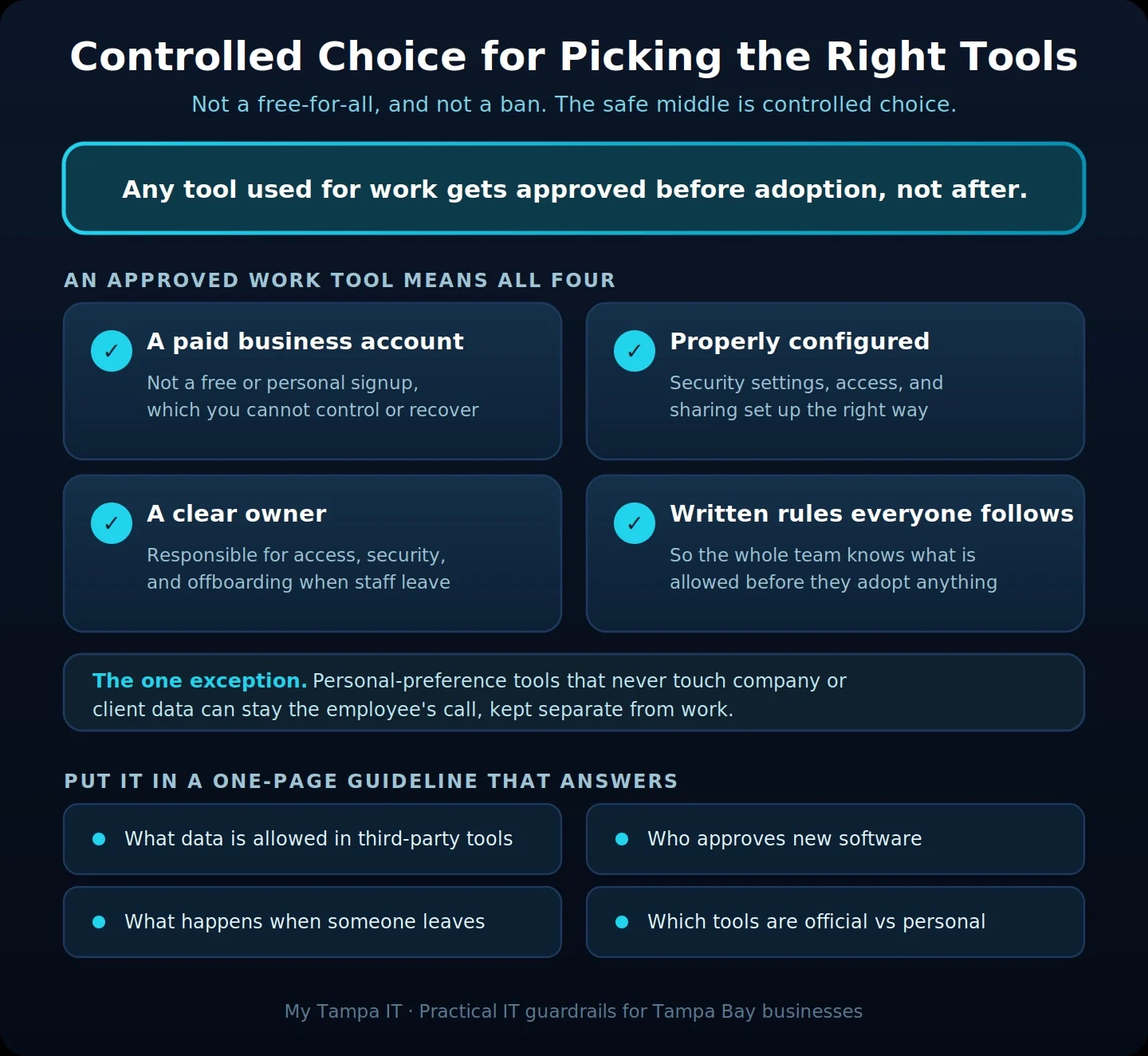
You do not need a complicated software policy. Before a new application is used for company business, answer four basic questions.
1. Who owns the account?
Business applications should generally be created using company controlled accounts, not an employee’s personal email address. The company should also know who has administrator access.
2. What information will go into it?
There is a big difference between a personal task list and an application containing customer records, financial information, employee data, passwords, contracts, or confidential files. The more sensitive the information, the more carefully the application should be reviewed.
3. How is it secured?
Look for security features such as multi-factor authentication, appropriate permissions, secure sharing controls, and the ability to remove access when someone leaves. Your business may also have contractual, compliance, or cybersecurity insurance requirements to consider.
4. Who is responsible for it?
Every important business application should have an owner who understands:
- Who has access
- What the company is paying for
- What information is stored there
- How access is removed
- What happens if the company stops using it
Without clear ownership, applications can quietly remain in use for years without anyone actively managing them.
A safer decision framework
If you want a quick way to run a new request through those four questions, this is the short version.
Shadow IT creates a visibility problem
When employees use applications without the knowledge or approval of the business, it is often called shadow IT. Most shadow IT is not malicious. Employees are usually just trying to work faster.
But the result can be company and client information spread across systems that leadership and IT do not know about. That creates a simple but important cybersecurity problem:
How can you protect information when you do not know where it is stored or which applications have access to it?
You can learn more about the risk of shadow IT and how it affects small businesses.
AI makes this even more important
AI has accelerated this problem because new tools are appearing constantly and employees are understandably interested in using them. The productivity benefits can be significant.
But businesses need to understand the difference between using AI for general productivity and putting sensitive business information into an AI platform. Asking an AI tool to brainstorm marketing ideas is very different from uploading customer records, employee information, contracts, financial statements, proprietary information, or confidential client communications.
Businesses do not need to ban AI. They do need clear guidance about which AI tools are approved and what information employees are allowed to put into them.
What should a small business actually do?
For most small businesses, the solution can be simple:
- Maintain a list of the systems your company officially uses
- Require approval before an employee signs up for a new application that will access, store, process, or transmit company or client information
- Make sure business accounts belong to the business
- Use multi-factor authentication wherever possible
- Keep track of who has administrator access
- Know which applications connect to Microsoft 365, Google Workspace, your CRM, financial systems, file storage, and other important platforms
- Include application access in your employee offboarding process
- Make it easy for employees to suggest better technology
That last point matters as much as the others. You want your team looking for ways to improve productivity. You simply want those improvements introduced without creating unnecessary security, cost, or operational problems.
The bottom line
Employees should have a voice in the technology they use. But the company needs to maintain ownership, security, and visibility.
The goal is not to control every application someone touches. It is to make sure that when a tool contains company or client information, someone has considered the security, ownership, cost, and long term impact before it becomes part of the business.
A little structure at the beginning can prevent a lot of cleanup later.
Not sure what your employees are using?
If you are not sure how many applications are being used across your business, where company and client information is stored, or which applications have access to your systems, you are not alone.
My Tampa IT helps small and midsize businesses evaluate their technology environment, identify cybersecurity gaps and unapproved applications, and put practical policies and protections in place without making technology harder for employees to use.
If you have questions about your current technology stack, AI tools, cybersecurity, or how to put reasonable guardrails in place, we are happy to help you determine what makes sense for your business.
Frequently asked questions
Get In Touch!
You’ve got questions. We’ve got answers.
Let’s start the conversation about your IT support needs.